


Beyond The Spreadsheet: A Float Software Review For Smart Teams
When you run a growing service business, managing your team feels like a giant puzzle. On Monday morning, you think you have enough people to cover your projects.
By Wednesday, a developer gets sick, a client demands a sudden revision, and your main designer is buried under three different tasks at once.
If you try to track all of this inside an Excel spreadsheet, things break down fast. You find yourself spending hours updating cells that instantly go out of date. That is why business owners seek specialized systems to keep their operations moving smoothly.
In this complete float software review, we will look closely see if it lives up to the hype. We want to find out if it is truly the simple answer your agency needs to stop overworking your people and start hitting your deadlines.
Float At A Glance
| Category | Rating |
| Ease of Use | 9/10 |
| Scheduling | 9.5/10 |
| Reporting | 7.5/10 |
| Value for Money | 8.5/10 |
| Overall | 8.8/10 |
How We Evaluated Float?
When reviewing software, it’s easy to get distracted by polished marketing pages and feature checklists. Instead of relying on those alone, we looked at Float from the perspective of a small agency that needs to schedule people, not just projects.
For this review, we compared Float’s official documentation with publicly available pricing information and verified user feedback on major software review platforms.
We also evaluated the platform against the day-to-day challenges most growing service businesses face, including workload balancing, project scheduling, utilization tracking, reporting flexibility, integrations, and long-term scalability.
Rather than asking whether Float offers the most features, we focused on a simpler question: does it genuinely reduce the amount of manual planning that teams do every week? That approach shaped every recommendation in this guide.
What is Float Resource Management Software?
Put simply, this platform is a live blueprint for your company’s time and talent. Instead of guessing who is free to work on what, you get a clean, drag-and-drop calendar that maps every single employee and project in your pipeline.
It serves as a central hub where project schedules intersect with real-time human availability. Managers can quickly log in and see exactly who is booked solid, who has free hours, and who is currently away on vacation.
[Traditional Spreadsheets] → Outdated instantly, messy rows, high human error
[Float Software Platform] → Live schedule, visual timelines, instant capacity check
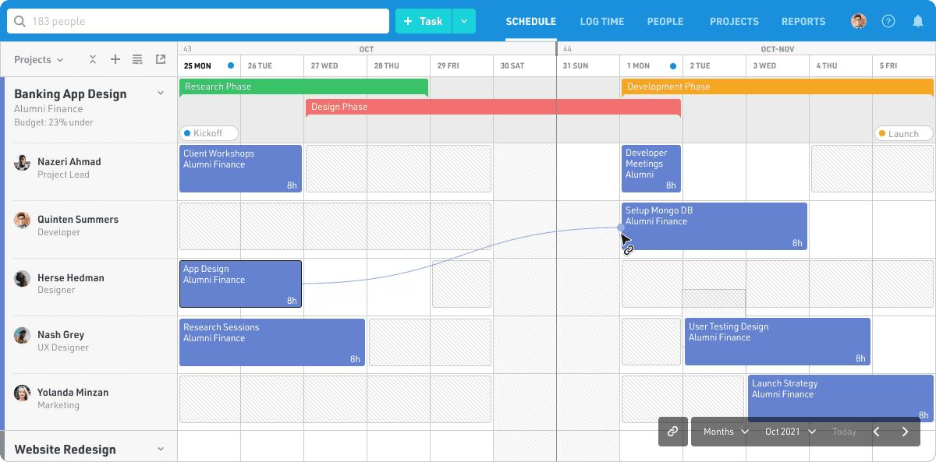
Figure 1. Float’s timeline view lets managers allocate work using a drag-and-drop schedule while instantly seeing team availability and workload distribution.
The core goal of this Float resource management software is to eliminate the guesswork from daily planning.
When a new project lands on your desk, you do not have to blast out panicked Slack messages asking your team if they have bandwidth. You just open the app, look at the visual timeline, and drop the assignment into an open slot.
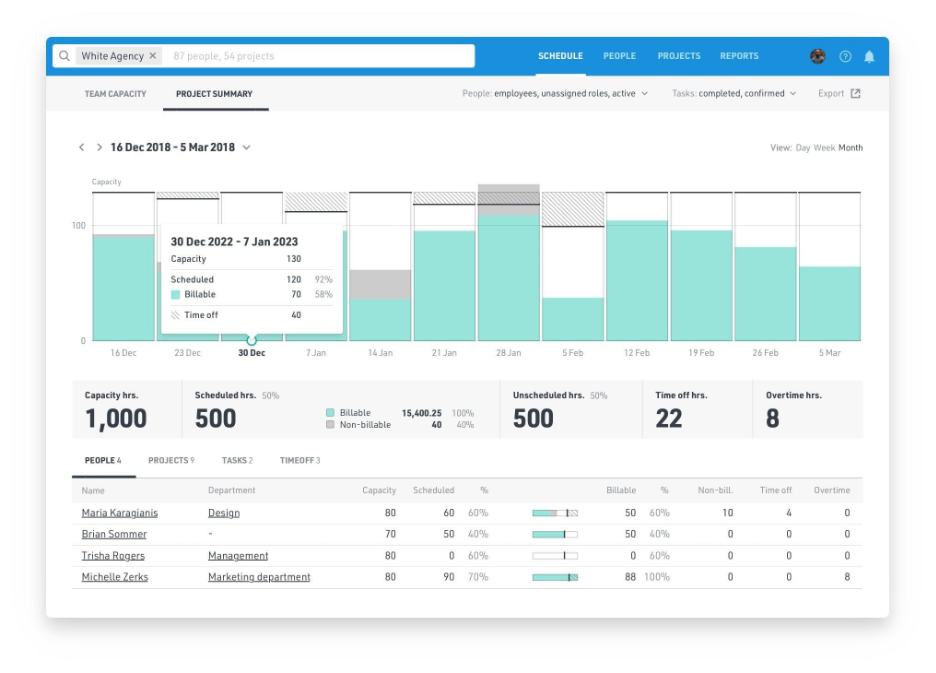
Figure 2. Float Dashboard showing the visual resource planning timeline, team availability, and project allocations.
Key Features That Matter to Growing Teams
Understanding the basic mechanics of this float software helps you see how it separates itself from generic calendar tools. It brings three main pillars together under one roof.
1. Visual Resource Scheduling
The centerpiece of the app is a massive, color-coded timeline. Employees are listed down the left side, while the calendar days stretch out to the right.
To assign a task, you simply click on a person’s row, drag your cursor across the days they need to work, and select the project. It takes seconds.
You can easily view your schedule by day, week, or month to spot long-term patterns before they become bottlenecks.
2. Live Capacity and Availability Tracking
Every worker has a unique profile where you can input their specific working hours, time-off requests, and skill sets.
If a team member works part-time on Tuesdays and Thursdays, the platform shows that constraint directly on the timeline. If you accidentally try to book someone for ten hours in a single day, the calendar flags it immediately so you can avoid burning out your best people.
3. Integrated Time Tracking
Planning out a project is only half the battle. You also need to know if your estimates match up with reality. The tool allows workers to log their actual hours directly alongside their scheduled tasks. This creates a powerful comparison view.
At the end of the week, you can see whether a task you thought would take five hours actually took fifteen.
What Using Float Feels Like Day-to-Day?
Many software reviews stop after listing features, but daily usability often matters more than feature count.
Imagine opening your team’s schedule on a Monday morning after three new client requests arrive overnight. Instead of rebuilding an entire spreadsheet, you move assignments across the timeline with a few clicks and immediately see who still has capacity and who is already overloaded.
The interface is designed around visibility rather than complexity. Most managers can understand the schedule within a few minutes because projects, availability, leave, and workloads all appear on the same screen.
That simplicity is probably Float’s biggest strength. It removes the constant back-and-forth that typically occurs among project managers, designers, developers, and account teams as everyone tries to figure out who can actually take on another piece of work.
The Most Viral Claims About Float Software: Compared
Online hype often paints a black-and-white picture of software. In the tech and operations community, the narrative around float software usually splits into two extremes:
| The “Viral Hype” Claim | The Reality Check |
| “It’s the ultimate replacement for Jira, Monday, or Asana!” | False. Float is explicitly not an end-to-end task manager or a full project management system. It doesn’t manage granular checklists, kanban boards, or task dependencies well. Rather, it is built to layer on top of those tools specifically for human resource allocation and high-level capacity planning. |
| “It completely kills the resource management spreadsheet.” | True. For agencies and professional services, this claim holds up. The drag-and-drop timeline instantly syncs team availability, time-off, and project allocations, making static Excel sheets look archaic. |
| “The easiest, most intuitive UI on the market.” | Mixed. While the desktop version features a beautiful, clean, color-coded grid that teams love, user reviews frequently call out a steep learning curve for non-project managers and a mobile app that has historically struggled with real-time syncing and layout freezes. |
What Evidence Was Missing From Most of These Claims
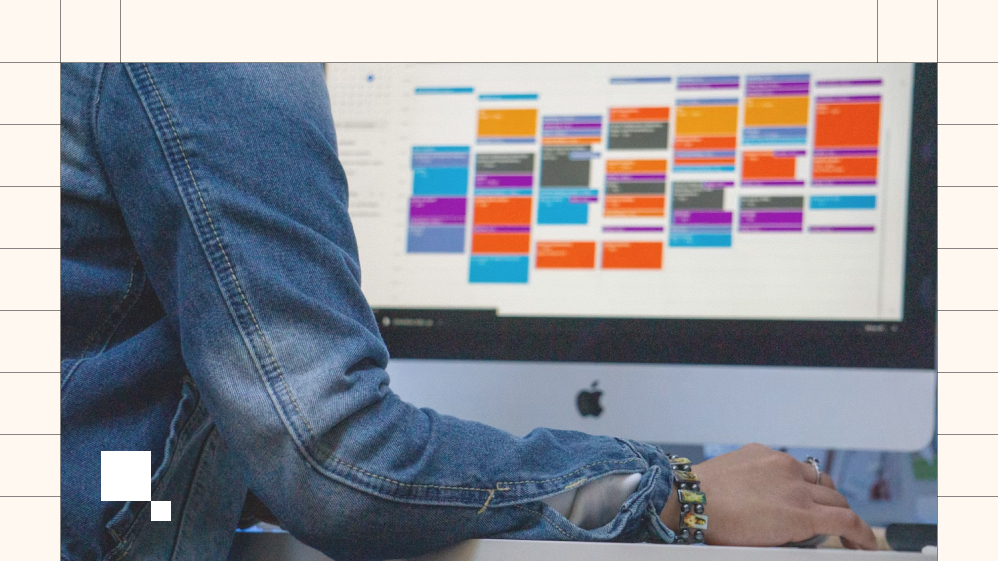
When influencers or software reviewers praise float software, they frequently omit the structural limitations that teams encounter during long-term implementation.
- Granular Reporting Gaps: Reviewers love showing off the “at-a-glance” dashboards. What they miss is that digging into deeper historical trends, complex data forecasting, or advanced analytics requires exporting data from Float entirely.
- The Global Team Reality: Viral videos rarely mention that Float lacks native, automated time-zone-shifting rules within its standard grid compared to rivals like Resource Guru. While you can tag a person’s location, managing cross-continental, highly distributed teams requires manual adjustments.
- The Hidden “Time Tracking” Cost: Praise for Float’s built-in timesheet automation ignores the fine print. To clarify, the time tracking and actual-vs-planned budgeting features are gated behind their higher-tier paid plans.
What “Extra” You Get From Float
If you look past the standard calendar grid, this float software option includes several specialized features designed for complex resource steering:
- Scenario Planning with “Draft Phases”: You can map out unconfirmed work or pitch pipelines directly alongside active, non-draft projects. This allows you to forecast resource needs for a client pitch without messing up your team’s live schedule.
- Timeline Shifting: If a client pushes a launch back by three weeks, you don’t have to manually drag fifty individual blocks.
- Float lets you shift a project timeline forward from a specific date in a few clicks, instantly freeing up your team’s capacity while preserving past logs.
- Capacity Indicators & Skill Tags: Instead of just showing what someone is doing, the system calculates real-time capacity percentages.
- With customizable skill tags (e.g., “Motion Designer,” “Senior QA”), operations leaders can filter and find the perfect, underutilized team member in seconds.
Where Float Doesn’t Replace Your Existing Tools
One misunderstanding appears repeatedly among first-time buyers. Float is often expected to replace every other project management platform inside a business. That isn’t really what it was designed to do.
Think of it as a traffic controller rather than the airplane.
Task management platforms such as Asana, Jira, Monday.com, or ClickUp still handle the detailed work itself. They store conversations, checklists, files, and task dependencies.
Float sits one level above them. Its job is to decide whether the right people actually have enough time to complete those tasks before deadlines begin to slip.
Companies that understand this distinction generally get much more value from the platform than those expecting an all-in-one business operating system.
Best Use Cases Of Float
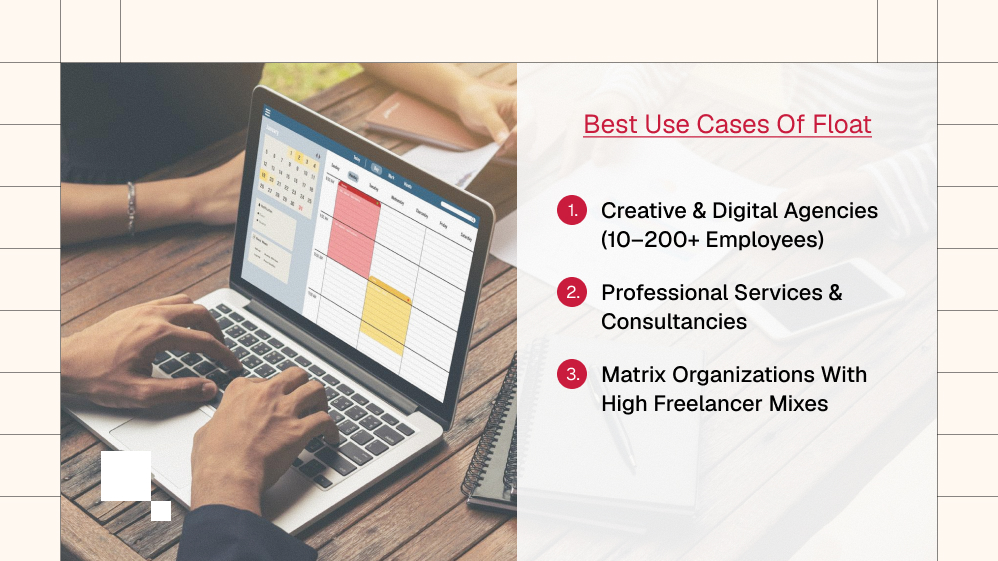
Float isn’t a one-size-fits-all tool. Based on its strengths, it is highly optimized for specific organizational structures:
- Creative & Digital Agencies (10–200+ employees): Ideal for shops juggling multiple fast-moving client projects simultaneously where people constantly shift between accounts weekly or daily.
- Professional Services & Consultancies: Perfect for firms that sell team hours and need to match specific project budgets against real-time billable vs. non-billable utilization rates.
- Matrix Organizations with High Freelancer Mixes: Operations teams that rely heavily on contract staff can easily spin freelancers into the grid, track their contract capacities, and seamlessly offboard them without disrupting historical project timeline data.
The Pros: Where This Platform Shines
No piece of software is perfect, but this tool gets a lot of things right for creative agencies, consulting firms, and software development shops. Here are the biggest benefits we found during our deep dive:
- Insanely Simple Interface: You do not need a degree in project management to understand what you are looking at. The learning curve is incredibly short, which means your team will actually use it.
- Fast Drag-and-Drop Changes: When a deadline shifts, you do not have to rebuild your plan from scratch. You just slide the blocks across the timeline to reassign the work instantly.
- Excellent Freelancer Integration: You can easily add external contractors to your schedule, assign them specific billable rates, and track their hours without mixing them up with your permanent staff.
- No More Spreadsheet Nightmares: Because everything updates live, every manager works off the exact same master schedule, eliminating communication breakdowns.
The Cons: Where It Falls Short
While the core scheduling features are stellar, there are a few limitations you should keep in mind before entering your credit card details.
- It Is Not a Full Project Manager: If you need a tool to store detailed task checklists, file attachments, and client chat threads, this is not it.
- It handles people and time, not granular task management. You will still need a tool like Asana or ClickUp for deep project execution.
- Reporting Can Feel Rigid: The dashboard gives you great high-level views of team utilization and budget burn rates.
- However, if you want to run highly customized formulas or deep historical trend analysis, you will likely need to export your data to a CSV file and build it yourself.
- Mobile App Restrictions: The mobile app works well for everyday team members who need to check their personal schedules or log their hours on the go.
- However, it is not ideal for managers who need to build complex schedules from scratch. That work is best left for the desktop view.
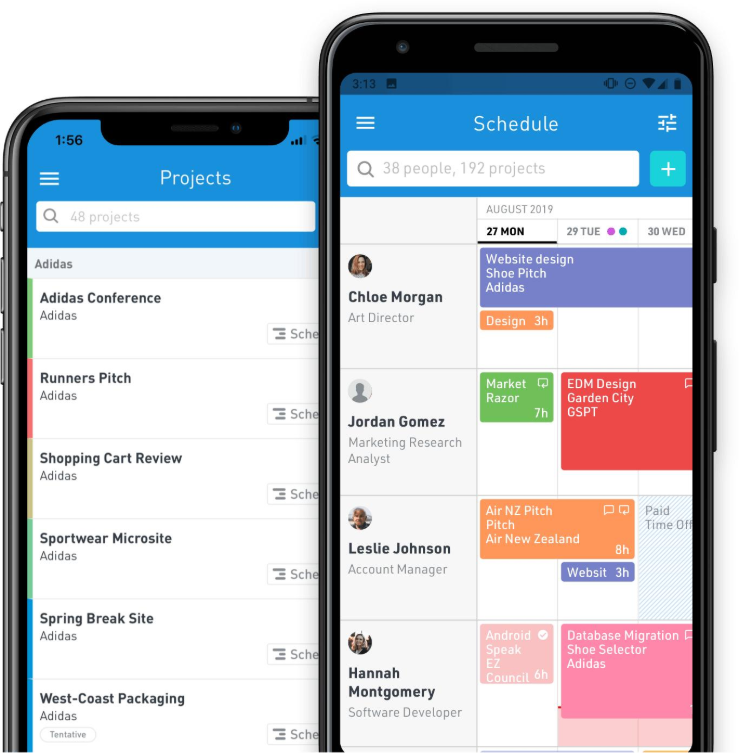
Figure 3. Float’s mobile app allows team members to check schedules, submit timesheets, and view assignments while away from their desks. It is best suited for day-to-day updates rather than building complex schedules.
Float vs Traditional Resource Planning
| Traditional Spreadsheet | Float |
| Manual updates | Live scheduling |
| Version conflicts | Shared workspace |
| Hard to spot overbooking | Instant utilization indicators |
| Limited forecasting | Capacity planning |
| Formula errors | Automated calculations |
Float Software Pricing Breakdown
Making a smart decision for your company means looking at the bottom line. The platform offers a clear, tiered pricing model based on the number of people you need to schedule each month.
A major plus here is that you only pay for the people you are actively tracking. To clarify, you are not charged for stakeholders who only need to view the schedule.
| Plan Tier | Monthly Price (Per Person) | Best Suited For | Key Inclusions |
| Starter | $7.00 | Small teams getting off spreadsheets | Visual scheduling, basic phase planning, real-time sync |
| Pro | $12.00 | Growing agencies needing deep metrics | Everything in Starter, plus time tracking, actuals vs. estimates reporting |
| Enterprise | Custom Quote | Large operations with strict security | Everything in Pro, plus single sign-on (SSO), dedicated support |
Source: https://www.float.com/pricing
Pro Tip: They offer a generous 30-day free trial that gives you access to all the core features. We highly recommend plugging in your actual team data during this trial period to see how the system handles your real-world weekly chaos.
Costs Beyond The Subscription
The subscription fee is only one part of the investment.
Most teams also spend time importing projects, adjusting working calendars, teaching managers how utilization percentages work, and encouraging staff to log their hours consistently.
Fortunately, these are usually one-time adjustments rather than ongoing problems. Once the team settles into a routine, the time saved through easier scheduling often outweighs the initial setup effort.
Considering these indirect costs before implementation creates more realistic expectations than looking at subscription pricing alone.
How To Get Started: A Simple Step-by-Step Guide
Getting a new tool up and running can feel overwhelming, but the setup process here is surprisingly gentle. Follow these four basic steps to transition away from your old, clunky spreadsheets:
Step 1: Add Your Team Members
Start by inputting your people. Add their names, job titles, and specific departments. Make sure to log out any custom working hours for freelancers or part-time staff and input any upcoming public holidays or pre-approved vacations.
Step 2: Input Your Active Projects
Create your current client projects. You can break these down into specific phases if you like, such as “Research,” “Design,” and “Testing.” You can also set specific budgets or maximum hours allowed for each phase to keep costs under control.
Step 3: Map Out Your First Week
Look at your upcoming workload and start dragging tasks onto your team’s calendar lines. Pay close attention to the visual capacity bars at the top of each day.
If the bar turns bright red, it means you have over-allocated that worker and need to shift something over to someone else.
Step 4: Connect Your Existing Work Tools
To get the most out of your setup, connect the platform to the communication and tracking systems you already use every day.
Linking it to Slack allows your team to get automatic notifications when their schedules change, while connecting it to Google Calendar ensures no one misses a client meeting.
How Float Integration Protects Your Bottom Line
When you run a services agency, your biggest expense isn’t your office rent or your software stack. It is your human payroll.
Every single hour that a senior developer or a creative director spends sitting on the bench without an active client project is cash leaking straight out of your bank account. Managing this balance isn’t just about smooth schedules; it is high-stakes cash flow management.
[Unallocated Team Hours] → Paid via Payroll → Zero Client Revenue → Profit Margin Drain
This is where linking your resource scheduling directly into your accounting framework saves the day. When you combine the scheduling data in your float software platform with your core business ledgers, you gain full visibility into your true financial trajectory.
Bridging The Gap Between Time And Money
Many small business owners track their operational capacities in one silo and their cash invoicing in another. That layout creates blind spots. By pairing your resource maps with a clear accounting flow, you unlock specific advantages:
- Real-Time Margin Tracking: You instantly see if the actual hours logged against a fixed-fee client contract are pushing you into a negative return before the month even ends.
- Automated Invoice Reconciliation: Instead of manually entering service hours at the end of every week, hours tracked in your Float resource management software can be fed directly into your billing systems. This completely eliminates human data entry errors.
- Accurate Hiring Forecasts: You can easily spot when your current staff is consistently at 90% utilization. This metric gives you the definitive green light to hire another full-time worker without risking your cash reserves.
Preventing The Hidden Overhead Trap
A massive mistake growing brands make is ignoring non-billable operational creep. Internal training, endless alignment meetings, and administrative tasks slowly eat away at your team’s weekly availability.
Using float software to label and monitor these non-revenue hours ensures your accounting records reflect the true cost of doing business.
You stop guessing why your cash balances look low, even though your team looks incredibly busy every day. You get clear, unshakeable proof to make profitable choices.
Who Should Probably Skip Float?
Not every business needs dedicated resource planning software.
You may find a simpler solution works better if your company has only one or two employees, manages very few simultaneous projects, or primarily tracks personal to-do lists rather than shared workloads.
Likewise, businesses seeking CRM capabilities, accounting functions, invoicing, or detailed task management will still need additional software, as those areas fall outside Float’s primary purpose.
For larger service teams, however, scheduling quickly becomes a coordination problem rather than a calendar problem. That is exactly where Float provides the most value.
Real User Experiences: The Verdict From The Field
To give you a completely balanced view in this Float.com review, we have combed through hundreds of verified user responses across major software evaluation platforms.
The overall sentiment is highly positive, sitting at a comfortable 4.3 out of 5 stars on G2 and a 4.5 out of 5 stars on Capterra.

Source: https://www.g2.com/products/float-com/reviews
Users regularly praise how easy it is to visually scan the room and instantly know who can take on a rush project. Creative directors say it saves them hours of administrative work every week.
On the flip side, some users note that when a team grows beyond a hundred people, the main timeline view can start to feel a bit crowded.
Others mention occasional performance lags when multiple managers try to make massive changes to the schedule simultaneously, requiring a quick page refresh to get everything back in sync.
Final Recommendation Based On Team Size
| Team Size | Recommendation |
| 1–3 people | Probably unnecessary |
| 4–10 people | Worth considering |
| 10–50 people | Strong recommendation |
| 50–200+ people | Excellent choice |
Is Float The Right Choice For Your Business?
At the end of the day, deciding to adopt Float resource management software comes down to the specific pain points you are trying to solve inside your business operations.
If you are a solo freelancer who only needs to keep track of your own personal schedule, this platform is likely overkill.
The robust capacity and scheduling features are designed for collaborative environments, and a simple personal calendar tool will serve you just fine.
However, if you manage a growing team of five or more people and find yourself constantly drowning in outdated spreadsheets, scheduling conflicts, and unexpected project delays, this software is a game-changer.
It gives you the clear financial and operational visibility you need to keep your projects profitable, your deadlines secure, and your team happy.
Frequently Asked Questions:
Yes. When you create tasks or projects, you can easily label them as billable or non-billable. This allows you to run clear reports showing exactly how much time your team spends on revenue-generating client work versus internal meetings and administrative tasks.
There is no permanent free tier, but they do offer a full 30-day free trial with no upfront credit card required. This gives you plenty of time to build out a live schedule and test the platform with your team before making any financial commitment.
Standard project management systems focus on tracking individual tasks, subtasks, and files from start to finish. This software focuses specifically on resource planning.
Thus, ensuring the right people are working on the right projects at the exact right time, without burning out. Most successful agencies use both types of tools together to cover all their bases.
Related Tools Worth Comparing
If you’re still deciding, these alternatives are worth exploring because each approaches resource planning differently.
- Resource Guru focuses heavily on scheduling and availability planning.
- Runn emphasizes forecasting and financial planning for professional services firms.
- Monday.com combines project management with broader workflow automation.
- ClickUp offers detailed task management with lighter resource planning capabilities.
- Asana works well for task execution but typically benefits from a dedicated resource-planning layer as teams grow.
Comparing these platforms against your own workflow is often more valuable than comparing feature counts alone.
Read Also:


Must Read

Popular Street Bikes for Everyday Commuting

Head Of Growth Marketing Responsibilities: A Beginner’s Guide To The Role

How To Build A Growth Marketing Strategy That Actually Works

Growth Marketing For Beginners: A Simple Way To Grow Your Small Business

Growth Navigate Startup Tools: The Strategic Tech Stack Framework For Scaling US Companies
Most Popular

A Guide For Deductibles and Premiums in Accident Insurance
Financial Survival Tips for Entrepreneurs in Debt
Toronto Car Insurance vs. Other Cities: Why Are Rates So High?

The Future of MENA Businesses: Why You Need Both Management & Accounting Software


Leave A Reply